Windows to Linux
Ready to switch between Windows and Linux? Discover easy ways to master both operating systems and make your transition smooth!
Here's a comparison table that highlights how to accomplish certain tasks in Windows vs. Linux:
Common Tasks
Install software
- Execute
.exeor.msiinstallers - Stores: Microsoft Store
- Package managers like
apt,dnf,yum, or install via.deb/.rpmpackages - Stores: Snap Store, Flathub, Discover (GNOME Software), KDE Discover
File Management
File Explorer
File managers like Nautilus, Dolphin, Thunar, or Caja, or terminal commands (e.g., ls, cp, mv)
View system information
- System Information app
- Settings > System > About

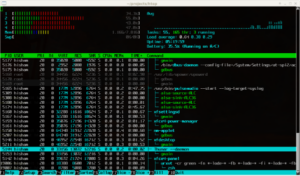
uname -a,top,htop,lscpu,free,df- HardInfo, Lshw-gtk
Update system
Windows Update in Settings
- Debian/Ubuntu-based:
sudo apt update && sudo apt upgrade - Arch-based (e.g., Arch Linux, Manjaro):
sudo pacman -Syu - Fedora:
sudo dnf upgrade --refresh - CentOS/RHEL (8+ using dnf):
sudo dnf upgrade - CentOS/RHEL (7 and below, using yum):
sudo yum update - openSUSE:
sudo zypper refresh && sudo zypper update - Alpine Linux:
sudo apk update && sudo apk upgrade - Gentoo:
sudo emerge --sync && sudo emerge --update --deep @world
Task management
Task Manager (Ctrl+Shift+Esc)
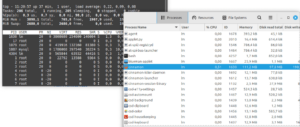
top,htop- System Monitor (GNOME, KDE), glances, Netdata, Mission Control
Change file permissions
Right-click file > Properties > Security
chmod and chown commands
Create a new file
Right-click on Desktop > New > File
touch filename- Text editor (
nano,vim,gedit)
View hidden files
Enable "Hidden items" in File Explorer
Press Ctrl+H in file manager or use terminal with ls -a
Install drivers
Use manufacturer's driver installers
- Often built-in kernel drivers
- Install manually with package managers (e.g.,
sudo apt install)
Edit system configuration
Edit files like system.ini, use GUI tools
Edit config files in /etc/ (e.g., /etc/fstab, /etc/hosts) using text editors in terminal
Compress/Uncompress files
Right-click file > Send to > Compressed folder
tar,gzip,zip,unzip- Graphical archivers like Archive Manager
Change network settings
Control Panel > Network and Sharing Center
- Use network management tools (e.g., nmcli, ifconfig)
- GUI tools like NetworkManager
Disk management
Disk Management (diskmgmt.msc)
fdisk, parted, gparted
Run a program as administrator
Right-click > Run as administrator
- Use
sudobefore a command in terminal - Right-click > Open as Root
Find a file
- Use Windows Search
- File Explorer search
- Execute
findcommand - GUI search tools
Check disk space
This PC > Properties
- Use
df -hin terminal - Disk Usage Analyzer (GUI)
Remote desktop
Remote Desktop Connection
ssh,VNC- Remmina
Create a new user
Control Panel > User Accounts
adduser or useradd in terminal
Network status
Run ipconfig in cmd
ifconfig or ip addr commands
Schedule a task
Task Scheduler
crontab
Take screenshot
Press Win Key + PrtSc keys then paste to Paint app or Win Key + Shift + S to open Snipping Tool then draw the region to save as a screenshot
Press PrtSc key
Batch rename files
Select files > Right-click > Rename > Enter name (names will auto-increment)
rename 's/oldname/newname/' *mv oldname newnamein a loop
Software Alternatives
| Category | Windows Software | Linux Alternatives |
|---|---|---|
| Command-line Interface | Command Prompt, PowerShell | Bash shell (bash, zsh, fish), Terminal app |
| Office & Productivity | Microsoft Office | Google Docs, FreeOffice, LibreOffice, OpenOffice, OnlyOffice |
| Outlook | Thunderbird, Evolution | |
| OneNote | Joplin, Obsidian | |
| QuickBooks | Wave | |
| Graphics & Design | Adobe Photoshop | GIMP |
| Adobe Illustrator | Inkscape | |
| Adobe Premiere | Kdenlive, DaVinci Resolve | |
| Adobe After Effects | Blender | |
| Maya, 3DS Max | Blender | |
| Paint.NET | Pinta, Krita | |
| AutoCAD | FreeCAD, LibreCAD | |
| Development | Notepad++ | Kate, Gedit, VSCodium |
| Visual Studio | Eclipse, Code::Blocks | |
| WinSCP | FileZilla | |
| PuTTY | Terminal (built-in) | |
| Media | Windows Media Player | VLC, SMPlayer |
| Winamp | Audacious | |
| iTunes | Rhythmbox, Clementine | |
| System Tools | Recuva | TestDisk |
| Task Manager | htop, System Monitor | |
| WinZip/WinRAR | 7-Zip, File Roller |
Common Terms
| Windows Term | Linux Term | Description |
|---|---|---|
| Folder | Directory | A container for files and other directories. |
| File | File | A single unit of data storage, same in both OS. |
| Drive (C:, D:) | Root directory / |
Linux uses a single root directory, no drive letters. |
| Explorer | File Manager (varies, e.g., Nautilus, Dolphin) | The graphical tool to navigate files and directories. |
| Command Prompt | Terminal / Shell | Interface for command-line input (Bash, Zsh, etc.). |
| DIR command | ls command | Lists files and directories within a directory. |
| Path separator (\) | Path separator (/) | Character used between directories in a path. |
| Programs | Packages | Applications are managed as packages in Linux. |
| Task Manager | System Monitor (varies, e.g., htop, GNOME System Monitor) | Monitors processes and system performance. |
| Registry | Configuration Files (e.g., /etc) |
Linux uses config files instead of a registry database. |
| Shortcut (.lnk) | Symbolic Link / symlink | Link pointing to another file or directory. |
| Control Panel | Settings / Config Files | Linux system settings are managed via various config files or GUIs. |
| Recycle Bin | Trash | Temporary storage for deleted files before permanent deletion. |
| User Account Control (UAC) | Sudo | Provides privilege escalation for administrative tasks. |
| System Drive (C:) | Root Partition (/) |
The primary storage location for system files. |
| Network Drive Mapping | Mounting | Linux mounts drives and network shares to directories. |